
Auto-Schedule AtCoder Contests on Google Calendar
Overview
The software enables users to generate direct scheduling links for AtCoder contests, seamlessly integrating them with Google Calendar. Designed specifically for competitive programmers, it simplifies the process of adding contest times to personal calendars without manual entry. This tool addresses the common challenge of tracking multiple contest dates across different platforms, helping users avoid missed deadlines and improve time management.
Targeted primarily at developers, students, and coding enthusiasts who participate in regular AtCoder events, the software streamlines workflow by reducing repetitive actions. The extension operates directly within the browser environment, requiring no installation beyond standard extension setup. While it is an unofficial tool, it functions as a utility to enhance planning efficiency for those committed to competitive programming.
The developer, penicillin0, has made the project publicly available on GitHub, indicating a community-driven approach. Users can report bugs or request new features through the project’s issue tracker. This transparency supports ongoing improvements and fosters user engagement. The tool is particularly useful during high-activity periods such as AtCoder Beginner Contests (ABC) or Regular Contests, where timely participation is crucial.
Key Features & Capabilities
- Direct Calendar Link Generation – Automatically creates a Google Calendar event link for any AtCoder contest, allowing one-click scheduling.
- Unofficial Extension Support – Designed to work with browser-based AtCoder pages without requiring server-side processing.
- Minimalist Design – Lightweight interface with no unnecessary elements, focusing solely on functionality.
- GitHub Integration – Users can submit feedback, report issues, or suggest enhancements via the public repository.
- Cross-Platform Accessibility – Compatible with Windows, Mac, and Linux through supported browsers.
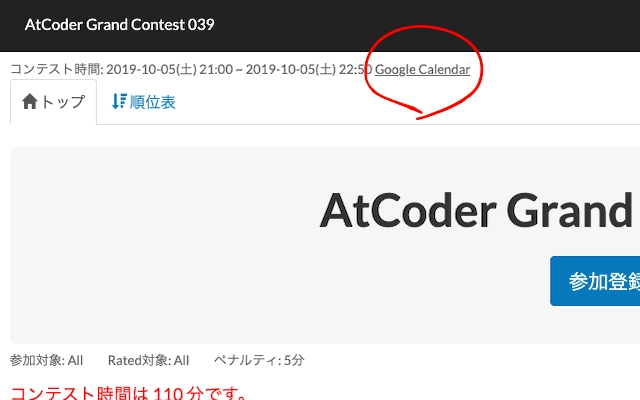
For example, when a user visits the AtCoder contest page, the extension displays a button to generate a calendar link. Clicking it opens a pre-filled Google Calendar event with the contest title, start time, and duration. This eliminates the need to copy dates manually or risk errors during entry. The tool is ideal for users managing multiple coding competitions across different platforms, helping maintain a centralized, up-to-date schedule.
User Interface, Workflow & Performance
The user interface is minimal and focused, designed to integrate smoothly into the browser environment. It appears as a small, context-sensitive button on the AtCoder contest page, reducing visual clutter. Navigation is intuitive: users simply visit the contest page, click the extension icon, and receive a ready-to-use calendar link.
Workflow efficiency is high, with the entire process completed in under five seconds. The extension does not require login or account creation, ensuring quick access. Performance is consistent with typical browser extensions—lightweight and responsive. The developer did not specify resource usage details, but the 50 KB file size suggests minimal impact on system performance.
Stability appears reliable based on the project’s public repository activity. The extension operates entirely client-side, meaning no data is sent to external servers. This enhances privacy and reduces the risk of latency or downtime. No performance bottlenecks were reported in the public issue tracker as of the release date.
Compatibility & System Requirements
The software is compatible with Windows, Mac, and Linux operating systems, supporting all major browsers through standard extension APIs. It is designed to function within the browser environment, making it independent of native desktop application requirements.
Installation size is 50 KB, indicating a lightweight footprint. The software version is 1.0.0, released on April 15, 2024. Exact system requirements were not listed, but compatibility is assumed to align with standard browser capabilities across modern desktop platforms. No specific hardware requirements were provided.
Users should ensure their browser supports extension installations and has JavaScript enabled. The tool does not require administrative privileges for setup. Platform compatibility information is limited to the listed operating systems, with no additional details on supported browser versions.
Pros and Cons
Pros
- Effortlessly generates Google Calendar links for AtCoder contests
- Free to use with no hidden costs or subscriptions
- Lightweight at only 50 KB in size
- Open-source with public GitHub repository for transparency
- Works across Windows, Mac, and Linux systems
Cons
- Unofficial tool—may not be supported by AtCoder or Google
- No official updates or support channels
- Relies on browser extension infrastructure
- Does not sync with other calendar platforms beyond Google
- Requires user to manage extension updates manually
FAQ Section
Is this tool officially supported by AtCoder or Google?
No, this is an unofficial extension. It is not developed or maintained by AtCoder or Google. Users should exercise caution and use it at their own discretion.
Can I use this on Windows, Mac, and Linux?
Yes, the extension is compatible with Windows, Mac, and Linux operating systems, provided the browser supports extensions.
Is the software safe to install?
The tool is open-source and runs entirely in the browser. It does not collect or transmit personal data. However, as it is unofficial, users should review the code and permissions before enabling it.
How do I update the extension?
Updates are managed through the browser’s extension store. Users should check for updates manually or enable automatic updates if available in their browser settings.
Can I use this offline?
Yes, once installed, the extension functions offline. It generates calendar links locally and does not require an internet connection to operate after setup.
Final Thoughts + CTA
Auto-Schedule AtCoder Contests on Google Calendar is a focused, efficient tool for competitive programmers who need to stay on top of contest schedules. Its simplicity, lightweight design, and free access make it a valuable addition to any coder’s workflow. While it is unofficial and relies on browser extensions, its open-source nature ensures transparency and community-driven development.
For students, developers, and coding enthusiasts who participate in AtCoder events regularly, this utility reduces friction in planning and helps maintain consistent participation. The lack of official support is a minor trade-off for the convenience and time saved.
Download Auto-Schedule AtCoder Contests now to streamline your coding competition planning.







